
下载量
1,060,943
关注数
66
数据来源
Modrinth
模组详细介绍
显示玩家是否分配了过少的 Java 内存,并在游戏加载完成时播放声音。
可在 config/loadsupport.toml 中完全配置。
配置 🚀
config/loadsupport.toml 中的配置非常容易理解:
loadFinishSound = "minecraft:ui.toast.challenge_complete"
minMemory = 4.0
errorTitle = "Error: Not enough Java memory!"
errorMinMemory = "Please allocate at least {minMemory} GB of Java memory to your Minecraft instance!"
errorCurrentMemory = "You have currently {currentMemory} GB allocated."
memoryInfoLink = "https://github.com/vaporvee/LoadSupport/wiki/How-to-allocate-more-memory-to-your-Minecraft-instance"
{minMemory} 和 {currentMemory} 会被替换为它们的实际值。
计划中的功能 👀
- 🪛 游戏内设置(支持 Mod Menu)
- 🧩 更多功能,让玩家知道 Minecraft 为什么没有加载完成
功能
当选择的 Java 内存过少时直接显示警告 🚨
玩家不需要等待,就能知道自己选择了错误的 Java 内存大小。
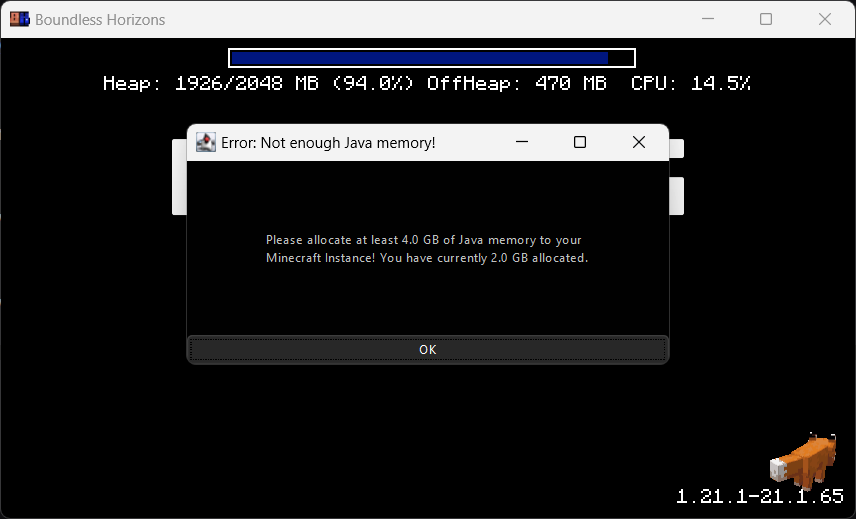
阻止游戏窗口继续运行 🚧
确保玩家获得正确的性能体验。
当 Minecraft 加载完成时播放声音 🔊
当游戏在后台运行时,也能立即知道 Minecraft 何时启动完成。
基本信息
模组名称Load Support
作者vaporvee
下载量1,060,943
关注数66
支持版本1.21.1 - 1.21.8
加载器fabric / neoforge
客户端required
服务端unsupported
