
下载量
1,228,254
关注数
283
数据来源
Modrinth
模组详细介绍
FramedBlocks 添加了各种形状的方块,并且可以让它们看起来像游戏中几乎任何其他方块。
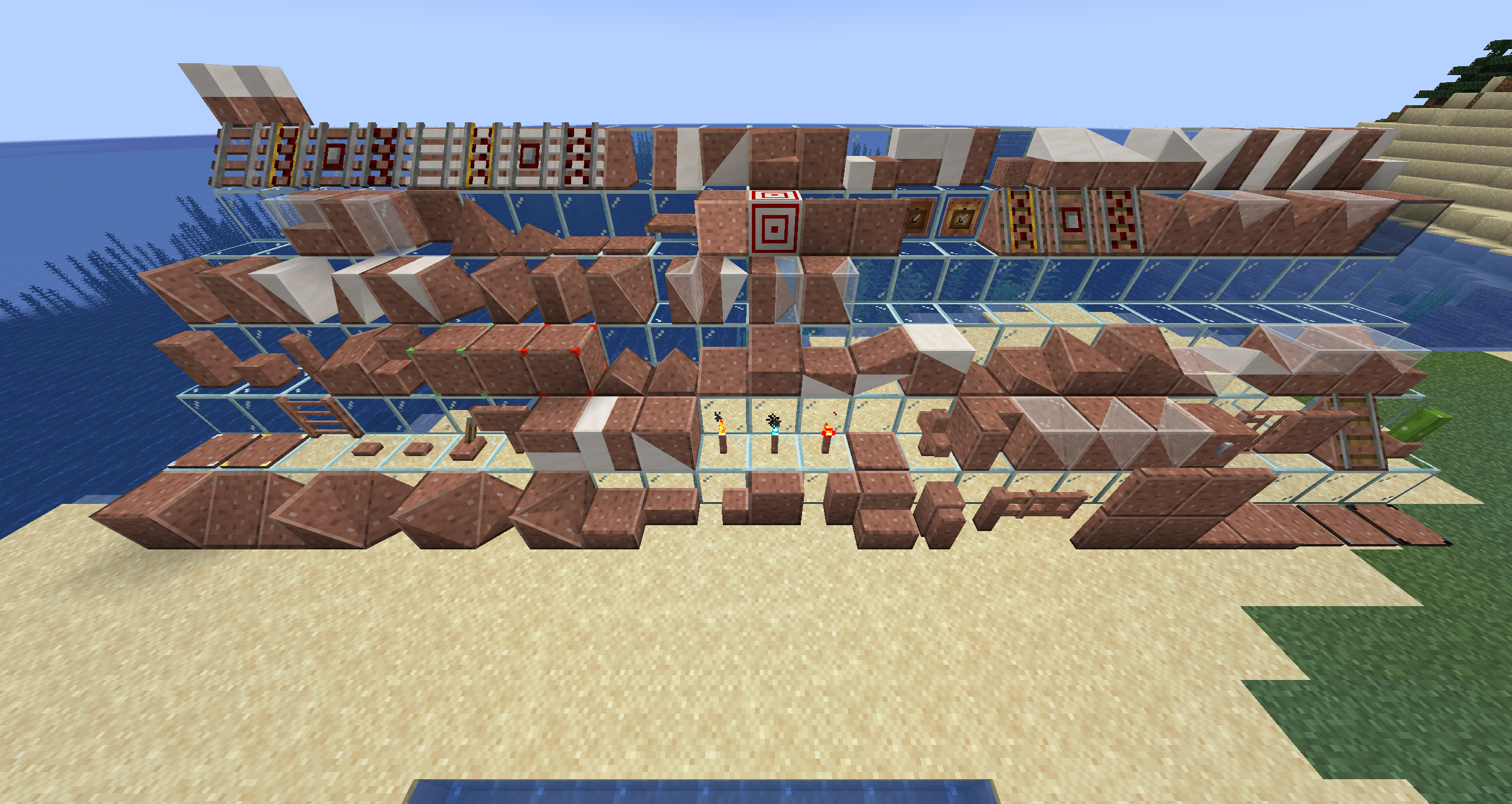
内容
形状选择(按图片中从左到右、从前到后的顺序)
- Framed Cube
- Framed Slope(也可以垂直放置)
- Framed Corner Slope(也可以垂直放置)
- Framed Inner Corner Slope(也可以垂直放置)
- Framed Prism Corner
- Framed Inner Prism Corner
- Framed Threeway Corner
- Framed Inner Threeway Corner
- Framed Slab
- Framed Slab Edge
- Framed Slab Corner
- Framed Panel
- Framed Corner Pillar
- Framed Stairs
- Framed Wall
- Framed Fence
- Framed Fence Gate
- Framed Door
- Framed Iron Door
- Framed Trapdoor
- Framed Iron Trapdoor
- Framed Pressure Plate
- Framed Stone Pressure Plate
- Framed Obsidian Pressure Plate
- Framed Weighted Pressure Plate (Heavy)
- Framed Weighted Pressure Plate (Light)
- Framed Ladder
- Framed Button
- Framed Stone Button
- Framed Lever
- Framed Sign
- Framed Double Slab
- Framed Double Panel
- Framed Double Slope(也可以垂直放置)
- Framed Torch
- Framed Soul Torch
- Framed Redstone Torch
- Framed Floor Board
- Framed Lattice
- Framed Vertical Stairs(可与 Stairs、Framed Stairs 和 Framed Half Stairs 交互以形成转角)
- Framed Double Corner(也可以垂直放置)
- Framed Double Prism Corner
- Framed Double Threeway Corner
- Framed Chest
- Framed Bars
- Framed Pane
- Framed Rail Slope
- Framed Flower Pot
- Framed Pillar(可沿三个轴放置)
- Framed Half Pillar(可朝六个方向放置)
- Framed Post(可沿三个轴放置)
- Framed Collapsible Block
- Framed Half Stairs
- Framed Bouncy Cube
- Framed Secret Storage
- Framed Redstone Block
- Framed Prism
- Framed Sloped Prism
- Framed Slope Slab(按住潜行键可倒置放置)
- Framed Elevated Slope Slab
- Framed Double Slope Slab(按住潜行键可倒置放置)
- Framed Inverse Double Slope Slab
- Framed Elevated Double Slope Slab
- Framed Flat Slope Slab Corner
- Framed Flat Inner Slope Slab Corner
- Framed Flat Elevated Slope Slab Corner
- Framed Flat Elevated Inner Slope Slab Corner
- Framed Flat Double Slope Slab Corner
- Framed Flat Inverse Double Slope Slab Corner
- Framed Flat Elevated Double Slope Slab Corner
- Framed Flat Elevated Inner Double Slope Slab Corner
- Framed Vertical Half Stairs
- Framed Slope Panel
- Framed Extended Slope Panel
- Framed Double Slope Panel
- Framed Inverse Double Slope Panel
- Framed Extended Double Slope Panel
- Framed Flat Slope Panel Corner
- Framed Flat Inner Slope Panel Corner
- Framed Flat Extended Slope Panel Corner
- Framed Flat Extended Inner Slope Panel Corner
- Framed Flat Double Slope Panel Corner
- Framed Flat Inverse Double Slope Panel Corner
- Framed Flat Extended Double Slope Panel Corner
- Framed Flat Extended Inner Double Slope Panel Corner
- Framed Double Stairs
- Framed Vertical Double Stairs
- Framed Wall Board
- Framed Pyramid
- Framed Pyramid Slab
- Large Framed Button
- Large Framed Stone Button
- Framed Horizontal Pane
- Framed Glowing Cube(在黑暗中发光,但不发出光照)
- Framed Target(Target 标记可被染色)
- Framed Gate
- Framed Iron Gate
- Framed Item Frame
- Framed Glow Item Frame
- Framed Powered Rail Slope
- Framed Detector Rail Slope
- Framed Activator Rail Slope
- Framed Inner Prism
- Framed Double Prism
- Framed Inner Sloped Prism
- Framed Double Sloped Prism
- Framed One-Way Window
- Framed Fancy Rail
- Framed Fancy Powered Rail
- Framed Fancy Detector Rail
- Framed Fancy Activator Rail
- Framed Fancy Rail Slope
- Framed Fancy Powered Rail Slope
- Framed Fancy Detector Rail Slope
- Framed Fancy Activator Rail Slope
- Framed Half Slope
- Framed Divided Slope
- Framed Double Half Slope
- Framed Sloped Stairs
- Framed Vertical Sloped Stairs
- Framed Divided Slab
- Framed Divided Panel (Horizontal)
- Framed Divided Panel (Vertical)
- Framed Mini Cube
- Framed Stacked Slope Slab
- Framed Flat Stacked Slope Slab Corner
- Framed Flat Stacked Inner Slope Slab Corner
- Framed Stacked Slope Panel
- Framed Flat Stacked Slope Panel Corner
- Framed Flat Stacked Inner Slope Panel Corner
- Framed Divided Stairs
- Framed Vertical Divided Stairs
用法
基础用法
- 手持几乎任意实体方块右键点击该方块,即可让它看起来与该方块一致。
- 手持流体容器右键点击该方块,即可让它看起来像容器中的流体(1.19+)。
- 手持 Glowstone Dust 右键点击该方块,可让它发光。
- 手持 Framed Hammer 右键点击该方块,可移除伪装。
- 手持空流体容器右键点击该方块,可移除流体伪装(1.19+)。
特殊行为
- Framed Prism、Inner Prism 和 Double Prism Corners 在放置时会根据其位置自动启用纹理偏移。这可以修复在用这些方块拼接更大表面时棱柱角无法正确贴合的问题。如果不需要此行为,可以使用 Framed Hammer 左键点击该方块来切换偏移状态。
- Framed Wrench(以及任何带有
"forge:tools/wrench"标签的物品)可用于旋转 Framed Block。对于大多数方块,旋转行为取决于你点击的是哪个面。
- Framed Screwdriver 可用于循环切换伪装方块的不同状态。
- Framed Blueprint 可以复制 Framed Blocks,包括它们的伪装和发光状态。Framed Block 本身的朝向不会被复制。
- Framed Collapsible Block 可以通过使用 Framed Hammer 修改单个方块某一面的四个角高度,来创建任意斜坡。左键点击你想修改的那个面的角会使该面向内移动,潜行时左键点击该角会使该面向外移动。此修改同一时间只能作用于单个面,并且只能在完整方块的边界范围内进行。如果四个角的位移方式导致它们无法形成一个平面,视觉结果可能会出乎意料。这是 OpenGL 内部工作原理导致的,并不是模组的 bug!分隔两个三角形的线方向可以通过使用 Framed Wrench 左键点击该方块来切换。
- 当服务器配置中启用后,大多数方块都可以通过使用 Phantom Membrane(可在服务器配置中更改)右键点击来变为无碰撞状态,从而允许你穿过它们。要移除此效果,请在潜行时使用 Framed Screwdriver 右键点击该方块。
- Framed Chest 的锁扣可通过使用 Framed Hammer 左键点击箱子在三种模式之间切换:
- 默认箱子锁扣(默认状态)
- 使用伪装纹理的锁扣
- 无锁扣
- Framed Key 可将某些 Framed Blocks 锁定为当前形状,以阻止邻居更新。这使得你能够以某些原本无法实现的方式放置方块(例如将 Framed Stairs 放置成转角形状,而无需保留强制其形成该形状所需的相邻方块)。
- Framed Pressure Plates(所有变种)可以通过使用 Framed Hammer 左键点击来在可含水和不可含水之间切换。其默认状态为不可含水,以匹配原版行为。
重要说明
请确保在 forge-client.toml 配置文件中启用 experimentalForgeLightPipelineEnabled 设置,以获得所有形状的正确光照效果。
配置
FramedBlocks 提供了一些配置选项,用于调整某些行为。以下列出了与玩家相关的主要选项。
通用
fireproofBlocks:通过禁用动态可燃性使 Framed Blocks 完全防火(默认:false)
客户端
showGhostBlocks:手持 Framed Block 时显示半透明的放置辅助预览(默认:true)fancyHitboxes:为斜坡等方块绘制自定义碰撞箱,而不是使用其实际的楼梯阶梯碰撞箱(默认:true)detailedCulling:在适用时隐藏 Framed Blocks 之间的面,即使该面没有填满整个方块面(默认:true)conTexMode:配置对 framed blocks 的连接纹理支持程度(默认:FULL_FACE)NONE:禁用连接纹理支持FULL_FACE:在位于方块体积外边界的完整面上启用连接纹理FULL_EDGE:除上述情况外,还会在位于方块体积外边界、非完整面上横跨整个方块宽度的边缘启用连接纹理DETAILED:除上述情况外,还会在大多数与其他 framed blocks 相邻的面上启用连接纹理支持overlay类别:配置某些特殊交互的覆盖提示显示程度(默认:DETAILED)HIDDEN:隐藏覆盖提示ICON:仅在准星旁显示覆盖提示图标DETAILED:显示图标和描述
服务器
allowBlockEntities:是否允许将带有 BlockEntities 的方块放入 Framed Blocks 中(默认:false)- 注意:将 BlockEntities 放入 Framed Blocks 在极少数情况下可能导致崩溃。要修复导致崩溃的方块,可以禁用此配置项,或将有问题的方块加入黑名单标签;这样在方块加载时,与任一更改冲突的伪装都会被移除
enableIntangibleFeature:启用无碰撞特性。禁用后也会阻止穿过已被标记为无碰撞的方块(默认:false)intangibleMarkerItem:用于让 Framed Blocks 变为无碰撞的物品。该值必须是有效的物品注册名(默认:minecraft:phantom_membrane)oneWayWindowOwnable:是否仅允许放置 One-Way Window 的玩家更改可透视的一面(默认:true)consumeCamoItem:应用伪装时是否消耗物品,并在移除时再次掉落该物品(默认:true
数据包功能
- 如果某个方块无法放入 Framed Block 中,而你认为它应该可以,你可以通过数据包将该方块添加到
framedblocks:frameable标签中。示例见这里。 - 如果某个方块可以放入 Framed Block 中,而你认为它不应该可以,你可以通过数据包将该方块添加到
framedblocks:blacklisted标签中。示例见这里。 framedblocks:camosustainplant标签中的所有方块都允许可种植在其上的植物,种植到以该方块作为伪装的 framed block 的对应实体面上。默认值请参见builtin tag。
已知问题
- 为缓解与 OptiFine 的崩溃而采取的措施会破坏 Framed Chest 箱盖的渲染。安装 OptiFine 后,打开箱子时箱盖不会移动。
基本信息
模组名称FramedBlocks
作者XFactHD
下载量1,228,254
关注数283
支持版本1.16.5 - 26.1
加载器forge / neoforge
客户端required
服务端required
